Motive Driver
- 4.5
- Rating
- 1.00M
- Installs
- Free
- Price

 Analysis by App-foxy
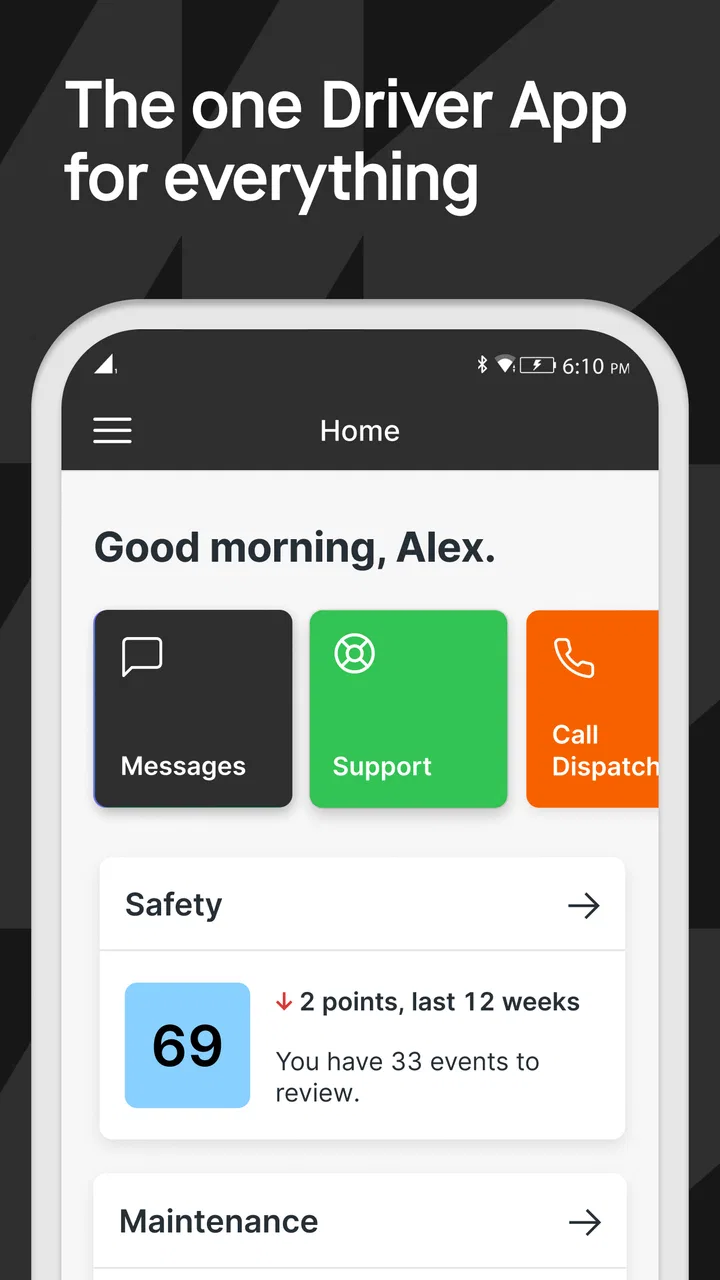
I found Motive Driver most useful when I stopped thinking of it as just another electronic logging tool and treated it as the daily control panel for a working driver. It brings together compliance work, safety-dashcam functions, vehicle inspections, and related driving tasks in one business-focused app. That combination can remove a surprising amount of friction from a normal route, especially when the alternative is switching between paper forms, a separate camera, and a different logging system.
My experience is that the app makes the most sense for professional drivers whose company already works with Motive Technologies Inc. It is free to install, rated for Everyone, and available for devices running iOS 9 or later. The audience is clearly commercial rather than casual: if you only drive a personal car, most of what makes this app valuable will feel unnecessary.
There is a reason it has reached more than a million installs and earned a 4.5 average from roughly thirty-five thousand ratings. Those figures do not make it perfect, but they do suggest that it has become a familiar part of many drivers’ routines. I also like that its current version, 103.1, reflects an actively maintained product rather than an abandoned utility.
You May Also Like

 Blood Strike: 2.5 Anniversary
Blood Strike’s Loadouts Turn Every Drop Into a Tactical Gamble
A close look at Blood Strike’s custom loadouts: how fast access to signature weapons reshapes its battle royale rhythm, rewards preparation, and narrows the gap between fights.

 Pandora - Music & Podcasts
Pandora’s Music Is Easy to Start, but Harder to Recover
Pandora’s strength is its low-effort path from a seed to a station. Its weak spot is how much confidence it asks you to place in connection, setup, and quiet recovery.

 8 Ball Pool
 Is Built on Rivalries, Rematches, and Routine
A close look at the rivalries, rematches, shared routines, and unanswered safety questions that turn a quick pool match into a persistent mobile community.

 Samsung Music
’s Quiet Strength Is Playing What You Already Own
Its reach comes less from spectacle than from dependable access to a personal library. That simplicity is both the app’s strongest retention engine and its ceiling.

 AccuWeather: Weather Radar
AccuWeather Review: A Quick, Clear Forecast for Everyday Decisions
For everyday plans, the best forecast is the one you can understand quickly. AccuWeather makes rain timing, radar, and local conditions easy to act on, with a few trade-offs.

 Hill Climb Racing
Why Hill Climb Racing Still Turns Crashes Into One More Run
A tiny car, a bumpy hill and one more upgrade: Hill Climb Racing keeps resurfacing because its simple chaos makes every near-miss feel personal.
More From Our News Desk



How I would build a dependable daily workflow
I would build a dependable routine around the moments when the vehicle is already parked: prepare, check the driver and vehicle context, complete the inspection, then review the log before setting off. That turns separate tasks into one deliberate sequence and makes interruptions easier to handle without rushing. Once that baseline feels natural, I’d look at which settings and device habits make it reliable for your particular cab and workday.
Start before the vehicle moves
The strongest habit with Motive Driver is to complete the administrative work before the route becomes busy. I would open the app while parked, check the current duty status, and handle the required inspection steps before pulling away. That order matters. Trying to reconstruct the beginning of a shift later is more stressful and makes small omissions easier to miss.
The app’s ELD role is most useful when it becomes part of a fixed sequence instead of something I remember only when prompted. My preferred routine is simple: prepare the vehicle, review the log, complete the inspection, and then begin driving. When the same order is repeated every day, the phone becomes a checklist rather than a distraction.
This is also where the app’s combined design helps. A paper inspection can be left in a cab, while a camera system may sit separately from the logging process. With Motive Driver, I can keep the compliance and safety-related parts of the shift in the same working environment. That does not remove the need for attention, but it reduces the number of places where information can be lost.
A realistic route-day example
Imagine starting an early delivery run after a vehicle change. I would not assume that yesterday’s routine applies automatically. I would first make sure the correct vehicle and driver context are active, inspect the truck, and review the status shown in the app. If something needs reporting, I would do it while parked, when I can describe the issue clearly and avoid rushing through the form.
During the route, the best habit is to leave the app alone unless a legitimate work task requires attention. The dashcam can serve its safety purpose in the background, while the driver concentrates on the road. At a stop, I would use the pause to review the log or finish an item that could not be completed safely earlier. This is a small distinction, but it separates useful mobile work from unsafe phone handling.
At the end of the shift, I would treat the closing review as important as the opening one. A quick look at the day’s status and inspection information can catch a mistake while the details are still fresh. It is much easier to correct a misunderstanding at the end of the route than after several days of relying on memory.
What the app replaces, and what it does not
Motive Driver can replace several disconnected habits, but it should not be mistaken for a complete substitute for judgment. An electronic log does not decide whether a situation is safe. A dashcam does not replace defensive driving. A digital inspection does not make a mechanical problem less serious.
That is why I would use the app as a structured record of work, not as permission to rush. Its value is consistency: the same place for important tasks, the same sequence each day, and fewer opportunities to forget a required step.
Settings I would check before relying on it
New users should spend time understanding the app’s basic configuration before their first demanding route. I would check how the driver profile is represented, how the vehicle is identified, and how the normal status workflow appears on screen. The goal is not to change every option; it is to make sure the app reflects the way the driver actually works.
I would also examine the dashcam-related setup carefully. A camera is only helpful when it has a clear view and the driver knows when it is active as part of the work system. The phone should be mounted securely and positioned so that using the app does not encourage unsafe reaching or glancing. The best configuration is the one that keeps the driver from interacting with the screen while moving.
Another worthwhile check is the inspection flow. I prefer to learn the order of the inspection items while parked, rather than discovering the layout at the start of a busy shift. If the app asks for details or evidence during a report, knowing where those controls are can save time and produce a more useful record.
The most important setup decision is not a cosmetic preference; it is creating a routine that can be completed without touching the phone while driving. That principle makes the app safer and usually makes it faster as well.
Why permissions and device preparation matter
A driver should expect a product that combines logging, inspections, and camera work to depend on the phone being ready for those jobs. I would keep the device charged, mount it consistently, and avoid placing it somewhere that blocks visibility or makes the controls awkward to reach while parked. A poorly prepared phone can make a capable app feel unreliable.
I would also make sure the driver understands which tasks belong in the app and which still belong in the company’s normal process. The application can organize the driver’s side of the work, but fleet procedures, supervisor instructions, and legal responsibilities still matter. This is especially important for new drivers who may assume that seeing a completed screen means every operational requirement has been satisfied.
Faster patterns that actually help
The quickest experienced users are not necessarily tapping faster. They are reducing decisions. I would keep the same pre-trip order, use the same parking locations for phone interaction, and complete related tasks together. For example, if I am already stopped for an inspection, that is a better moment to review the day’s log than opening the app repeatedly during scattered pauses.
I would also use short, repeatable checks rather than waiting for a large block of time. A brief review at the start, a deliberate check during a lawful stop when something changes, and a closing review can be more reliable than trying to remember everything at the end. This pattern is particularly useful for drivers who move between vehicles or routes.
Another practical shortcut is to learn the app’s visual language. Once I know where the current status, inspection area, and safety functions are located, I do not need to explore the whole interface every time. That familiarity is more valuable than memorizing obscure gestures or trying to turn the phone into a full office.
Where the combined approach saves time
The main time saving comes from context. A driver can deal with compliance and inspection duties in the same general workflow instead of maintaining separate paper notes and a separate camera routine. When a vehicle issue appears, having a digital place to record it immediately is more useful than relying on a memory that is already occupied by traffic, deliveries, and schedule pressure.
For fleet operators, the safety-dashcam element also changes the app’s role. It is not merely a private logbook; it is part of a broader work process in which driving events and vehicle condition may need to be reviewed. That can be reassuring for some drivers and uncomfortable for others. I would be clear about that trade-off before choosing it.
Advanced limits that deserve honest attention
The biggest limitation is that Motive Driver is not a universal solution for every driver or every company. Its usefulness depends heavily on whether the surrounding fleet workflow supports it. If an employer uses another ELD platform, another inspection system, or a different camera arrangement, installing this app alone may create duplication rather than simplicity.
It can also feel like more app than a small operator needs. A solo driver with a straightforward paper process may not want a connected business tool that combines several responsibilities. In that case, a simpler logging option may be easier to understand and maintain, provided it meets the driver’s actual compliance and company requirements.
The phone itself is another possible weak point. A small screen, low battery, poor mounting position, or an aging device can make routine tasks frustrating. The app cannot compensate for a distracting cab setup. I would rather use a modest feature set consistently on a well-prepared device than enable every available function on hardware that is difficult to use safely.
There is also a human limitation: digital records encourage confidence, but they do not eliminate mistakes. A driver can select the wrong status, overlook an inspection detail, or assume a report is complete without reading it. The app makes correction easier than paper in many situations, but only if the driver reviews what was entered.
Who should use it, and who should look elsewhere
I would recommend Motive Driver to professional drivers who need ELD compliance, electronic inspections, and safety-dashcam work within a fleet-centered system. It is especially suitable for someone who values a repeatable routine and wants fewer separate tools in the cab. The app also makes sense for drivers who regularly switch between administrative tasks and driving, because keeping those tasks together can reduce forgotten steps.
I would be more cautious about recommending it to a private motorist, a casual driver, or a small operation that does not use Motive’s wider workflow. Those users may find the business focus excessive. A standalone navigation app, a basic camera, or a simpler log solution could be a better fit depending on the job.
Drivers who strongly dislike digital monitoring should also think carefully. The safety-dashcam function is a meaningful part of the product’s identity, not an incidental extra. Some people will appreciate the added record and accountability; others will prefer a tool with a narrower role.
My verdict after settling into the routine
Motive Driver is at its best when it becomes a disciplined daily habit rather than an app opened only when something goes wrong. I like the way it brings ELD work, inspections, and safety-camera duties into one driver-facing experience. The free price makes it easy to try, and its Everyone age rating keeps the product approachable even though its purpose is clearly professional.
My recommendation comes with a condition: use it with a proper vehicle workflow. Learn the screens while parked, confirm the driver and vehicle context, keep the phone mounted safely, and review entries instead of trusting them blindly. Those habits are more important than any individual shortcut.
With that approach, Motive Driver feels practical and focused. It is not the right choice for someone looking for a general driving companion, and it cannot replace company procedures or sound judgment. For the professional driver whose fleet already relies on Motive Technologies Inc., however, it can turn several scattered responsibilities into one repeatable routine. That is the reason I would recommend it to a working driver friend: not because it does everything automatically, but because it makes the important everyday steps easier to organize and harder to forget.
FAQs for Motive Driver
01What is Motive Driver and how does it work?
Motive Driver is an app designed for fleet management, helping businesses track and optimize their vehicle operations. It offers real-time GPS tracking, driver safety monitoring, and vehicle diagnostics. By using this app, managers can ensure efficient route planning, reduce fuel costs, and improve overall fleet productivity.
02Is Motive Driver compatible with both Android and iOS devices?
Yes, Motive Driver is available for both Android and iOS platforms. Users can download the app from the Google Play Store or the Apple App Store. Ensure your device meets the minimum system requirements for optimal performance and access to all features.
03What features does Motive Driver offer for driver safety?
Motive Driver includes several features to enhance driver safety. These include real-time alerts for harsh braking, speeding, and rapid acceleration. The app also provides detailed reports on driver behavior, helping managers address safety issues and encourage safer driving practices.
04Does Motive Driver require any additional hardware for tracking?
Yes, to utilize the full tracking capabilities of Motive Driver, businesses may need to install GPS tracking devices in their vehicles. These devices work in conjunction with the app to provide accurate location data and vehicle diagnostics, enhancing overall fleet management.
05Is there customer support available for Motive Driver users?
Absolutely, Motive Driver offers customer support to assist users with any issues or questions they may encounter. Support is available through various channels including phone, email, and live chat, ensuring users can get the help they need promptly.
Pros
- User-friendly interface enhances navigation.
- Real-time tracking ensures accurate data.
- Customizable alerts for driver preferences.
- Seamless integration with fleet systems.
- Comprehensive reporting tools for managers.
Cons
- Limited offline functionality affects use.
- Occasional sync issues with data.
- Notifications can be overwhelming.
- Requires constant internet connection.
- Some features are subscription-based.

Motive Driver
Gallery